
Appearance
Proxy and linked models · SketchUp
Use wireframe placeholders for complex models in SketchUp and see the full models in Lite. This feature is available in D5 Lite 1.8.0 for SketchUp on Windows. Choose a custom proxy or a linked model based on where the original model is stored.
| Method | Model source | When to use it |
|---|---|---|
| Custom proxy model | A component in the current SketchUp file | Replace an existing complex component with a placeholder, then restore it when you need to edit its geometry |
| Linked model | An external .skp file | Place a separate model in the scene using a lightweight placeholder |
Custom proxies are for your own components. Models placed from the D5 Asset Library already use proxies and do not need to be converted again.
Custom proxy models
Convert to a placeholder
Conversion applies to every instance of the selected component definition. Check that all of these instances should use placeholders before converting.
- Select the component in SketchUp.
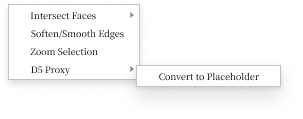
- Right-click and choose D5 代理模型 → 转占位 (D5 Proxy → Convert to Placeholder).
- SketchUp displays a wireframe placeholder. Start Lite and check the full model in the viewport.
- Save the file in SketchUp to keep the conversion.
Restore a component
Select the placeholders to restore, then right-click and choose D5 代理模型 → 还原 (D5 Proxy → Restore). The selected placeholders become editable original components again. Other placeholders can remain in place. Save the file in SketchUp after editing.
Link an external model
- Save the current SketchUp file.
- Click Link Model on SketchUp’s D5 Lite (Beta) toolbar, or choose Extensions → D5 Lite (Beta) → Link Model.
- Select an external
.skpfile. The current file cannot link to itself. - Click in the SketchUp viewport to place the placeholder, or press Esc to cancel placement.
- Start Lite and check the full model. Save the file in SketchUp to keep the placeholder's position.
Keep the external source file at an accessible path. If it is missing, SketchUp retains the wireframe placeholder, but Lite cannot display the corresponding full model.
Linked models do not use the custom proxy's restore command. Edit the external source file when you need to change the original geometry.
After editing and saving the external .skp file, reopen the main SketchUp file that links to it. Start Lite and check the updated model in the viewport.
SketchUp's Link Model references an external .skp file. For native Revit links, see Real-time rendering & sync.
Sync to D5 Render
Close Lite, then click Connect to D5 Render on the D5 toolbar in SketchUp. When you sync the SketchUp model, D5 Render displays the full geometry of both custom proxy models and linked .skp models.
A .d5a export does not carry the full geometry of these models; see Export .d5a.